What Is a Shot List? Free Template for Filmmakers
A shot list is the ordered inventory of every camera setup you need. Here is the complete template, what each column means, and how to build one that works.
What Is a Shot List? Free Template for Filmmakers
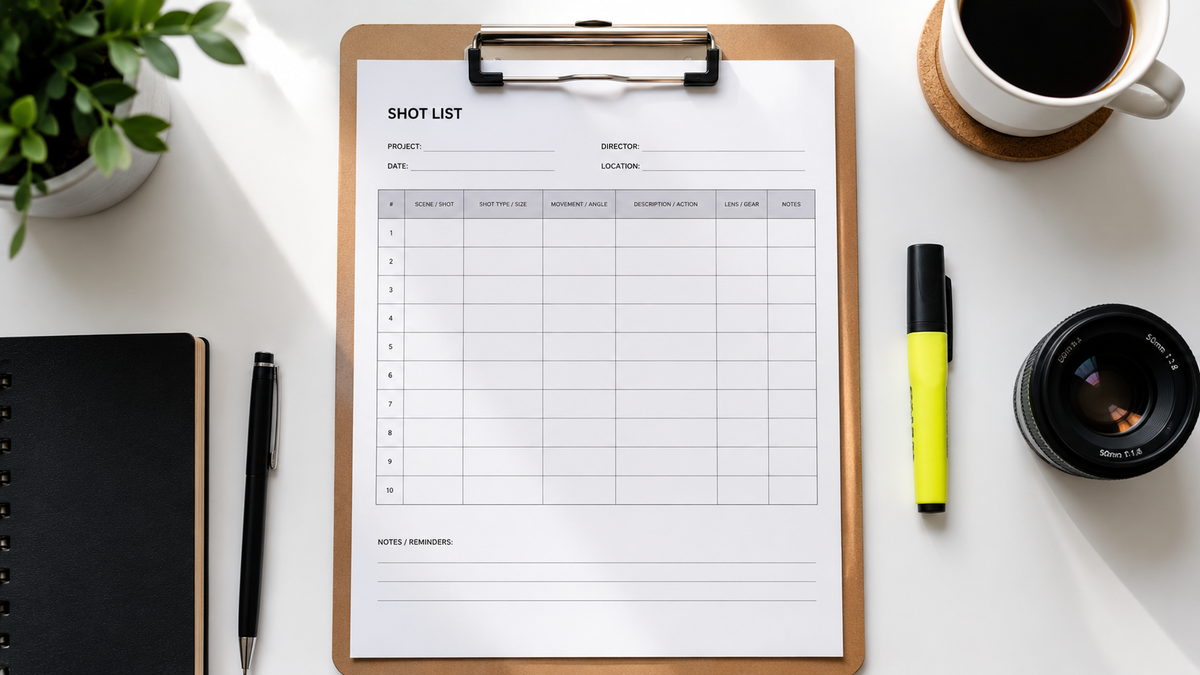
A shot list is the ordered inventory of every camera setup you plan to capture for a scene or a production. Each row describes one shot precisely. It is the document a director, DP, and 1st AD use to agree on exactly what will be shot, and in what order, before the day begins. Its job is to be the bridge between the storyboard — what the shot looks like — and the schedule — what you shoot and when.
The shots you forget are never the hero shots. They are the cutaways, the inserts, the establishing wide you needed to make the scene cut together. A shot list is the cheapest insurance in pre-production: it costs an hour to build and saves the day you would otherwise spend reshooting what you never captured.
The shot list template
Each row in a shot list represents one camera setup. A good row answers one question completely: if you hand this line to a camera operator, can they build the shot without asking you anything? If the answer is no, the row is incomplete.
The standard columns are:
Scene number — The scene from the screenplay this shot belongs to. Ties the shot list to the script and the schedule. If you are working across multiple scenes in a day, this is how the 1st AD groups and sequences the work.
Shot number — A unique reference number for each shot, typically formatted as scene number plus a letter (1A, 1B, 1C) or a sequential number within the scene. This is what the slate identifies on set and what the editor uses to log and find takes.
Shot size — The framing of the subject in the frame. Standard designations: ECU (extreme close-up), CU (close-up), MCU (medium close-up), MS (medium shot), MWS (medium wide shot), WS (wide shot), EWS (extreme wide shot). Use the abbreviation consistently — your camera operator and 1st AD have to read this at speed.
Shot type — The category of shot beyond framing. Examples: OTS (over-the-shoulder), POV (point of view), two-shot, insert, cutaway, reaction, establishing. A medium shot of two characters talking is different from an OTS — the type tells the operator the relationship between camera and subject.
Camera angle — Where the camera sits relative to the subject. Eye level, low angle, high angle, Dutch angle, bird's eye, worm's eye. If the angle is neutral, you can omit this or write "eye level." If it matters, specify it.
Camera movement — What the camera does during the shot. Static (locked off), pan, tilt, dolly in, dolly out, tracking shot, crane up, handheld, Steadicam, zoom in, zoom out. If the shot is static, write "static" — it clarifies intent and prevents the camera operator from adding movement that is not wanted.
Lens — The focal length if it matters to the look. Wide (14–24mm), standard (35–50mm), medium telephoto (85mm), telephoto (135mm+). For shots where focal length is a specific creative decision — a telephoto compress for surveillance feeling, an ultra-wide for distortion — specify it. For standard coverage, omit or write "standard."
Subject / action — Who or what is in the shot and what they are doing. "Sarah picks up the envelope and reads it" is a subject/action description. "Character reads letter" is too vague. The more specific the description, the clearer the brief for the actor, the operator, and — in AI filmmaking — the generation model.
Audio — Whether the shot captures sync sound (dialogue, production audio), wild track (ambient sound captured separately), or is intended to be covered by music or sound design only. If the shot is picture-only, note it. Audio requirements determine microphone placement and whether the sound department needs to be active on the setup.
Notes — Anything that does not fit the other columns: special equipment, lighting requirements, continuity flags, VFX markers, prop notes, safety considerations. Keep notes brief. If a note requires more than one sentence, it belongs in a separate pre-production document.
A complete example row
| Scene | Shot | Size | Type | Angle | Movement | Lens | Subject / action | Audio | Notes |
|---|---|---|---|---|---|---|---|---|---|
| 12 | 12A | WS | Establishing | High angle | Static | 24mm | Empty street at dawn, Sarah enters frame from right | Ambient | Practical street lights must be on |
| 12 | 12B | MS | Single | Eye level | Dolly in | 50mm | Sarah stops, looks up at building | Sync | Start dolly as she stops |
| 12 | 12C | CU | Insert | Eye level | Static | 85mm | Sarah's hand on door handle | None | Tight — fingertips and handle only |
What to build before you start the shot list
A shot list written without a completed storyboard is usually a shot list that gets revised on set. The sequence for pre-production is: script first, storyboard second, shot list third. The storyboard tells you what each shot looks like. The shot list translates each storyboard frame into a shootable, schedulable row.
If you do not have a storyboard, at minimum have a beat-by-beat breakdown of what each scene needs to accomplish narratively before you start listing shots. Every shot on the list should serve a specific narrative or coverage function. If you cannot state what function a shot serves, it probably does not belong on the list.
Coverage is not the same as completeness. A shot list is not an attempt to capture everything — it is a plan to capture exactly what you need to cut the scene together. Over-shooting wastes time on set. Under-shooting creates problems in the edit. The shot list is where you find the balance before the camera rolls.
How the shot list changes in AI filmmaking
In traditional production, a shot list tells a camera crew what to capture. In AI filmmaking, it tells a generation pipeline what to produce. The function is identical. The brief needs to be equally precise — more so, because a human camera operator can ask a question on set, and a generation model cannot.
In Induce, the shot list is not a separate document maintained in a spreadsheet outside the production. It lives inside the pipeline. Every shot brief is tied to the characters, locations, and creative decisions already held in the Project Memory Graph. When a shot calls for a character, the generation is automatically briefed against that character's locked reference. When a shot specifies a location, the lighting world and visual rules for that location travel into the generation call. The shot list becomes an active document — one that connects each row to the story logic the production has already established, and that routes each shot to the model best suited to produce it.
The result is that the precision of your shot list determines the consistency of your footage. A vague subject/action description — "character reacts" — produces a vague clip. A precise one — "Sarah, mid-shot, turns toward camera as she hears the door, expression shifting from relief to alarm" — produces a clip that serves the scene and matches the coverage around it.
For filmmakers using Induce, the shot list is where story intent becomes generation brief, and where the gap between what you planned and what you get is smallest.
What is a shot list?
+An ordered inventory of every camera setup planned for a scene or production. Each row describes one shot precisely — its framing, angle, movement, subject, and audio requirements. It is the document that bridges the storyboard and the shooting schedule, and the primary reference for the director, DP, and 1st AD on set.
What columns should a shot list include?
+At minimum: scene number, shot number, shot size, shot type, camera angle, camera movement, subject/action, audio, and notes. Lens can be added when focal length is a specific creative decision. The most important column is subject/action — this is the brief that tells the operator (or the generation model) what the shot needs to contain.
How long should a shot list be?
+It depends entirely on the production. A single dialogue scene with two characters typically requires eight to fifteen shots for complete coverage. A thirty-second commercial might have twenty to forty shots. A feature film will have several hundred. There is no target number — the list is complete when every shot needed to cut the scene together is accounted for.
What is the difference between a shot list and a storyboard?
+A storyboard is a visual document — drawn frames showing what each shot looks like compositionally. A shot list is a written document — a table describing each shot's technical specifications. They cover the same information in different forms. The storyboard is better for communicating visual intent to crew and collaborators; the shot list is better for scheduling, logistics, and on-set reference.
Can I use a spreadsheet for a shot list?
+Yes. Google Sheets or Excel with the columns described above is the standard format for most productions. Dedicated tools like StudioBinder, Boords, Celtx, and Storyflow offer additional features — syncing with the script, scheduling integration, collaboration — but the underlying structure is the same. Start in a spreadsheet if you are new to shot listing; move to a dedicated tool when the production complexity justifies it.
Related posts

What Is a Synopsis? How to Write One That Works
A synopsis is not a summary — it is a sales document that proves your story works. Here is what it must include and how to write one that gets read.
By Ranga Nikhilesh

What Is a Smash Cut? Definition & Examples
A smash cut is an abrupt edit that cuts mid-action to a completely different scene for deliberate effect. Here is how it works and the best examples.
By Ranga Nikhilesh
What Is a Foil in Literature? Definition & Examples
A foil is a character who contrasts with another to reveal qualities neither could show alone. Here is the definition, how it works, and the best examples.
By Ranga Nikhilesh