AI filmmaking7 min read
AI Video for Corporate Training Scenarios: How to Make One
How to plan, script, generate and review a dramatised training scenario with AI video, with a worked example and a review sheet you can copy.
An AI training scenario is a short dramatised scene, made with generated footage instead of a film crew, in which learners watch a workplace situation unfold and then decide what should happen next. It suits soft skills, safety, compliance and customer service, where seeing behaviour matters more than hearing a rule. The work that makes it useful is the same as for a filmed scenario: a tight script, a clear decision point, a consistent cast and a subject expert who checks every take.
When should a training video be a scenario instead of a presenter?
A lot of AI training video is presenter video: an avatar reads a script to camera, often over slides. That format is fine for explaining a policy, walking through software or announcing a change. It's cheap to update and nobody has to act.
A scenario does a different job. Instead of telling a learner what good behaviour looks like, it shows two or three people in a room and lets the learner judge. That's useful whenever the skill is about reading a situation: noticing that a customer is about to escalate, spotting the moment a forklift driver skips a check, hearing a manager say something in a performance review that will cause trouble later.
| Question about the content | Presenter video | Dramatised scenario |
|---|---|---|
| Is the goal to explain a rule or a process? | Good fit | Usually overkill |
| Does the learner need to recognise behaviour? | Weak | Good fit |
| Are there two or more people interacting? | Hard to show | Good fit |
| Will the learner make a choice afterwards? | Possible with a quiz | Natural fit |
| Does the content change every few weeks? | Good fit | Plan for reuse of cast and set |
| Is it a software walkthrough? | Use a screen recording | Not a fit |
If most of your answers land in the right column, write a scenario. If they land in the left, a presenter or a screen recording will be quicker and clearer.
What makes a training scenario work?
Instructional designers tend to agree on the ingredients, whatever tool produces the footage.
- A realistic situation. The setting, the job titles and the stakes should look like the learner's own workplace. A call centre agent won't take a lesson from a scene set in a law firm.
- One decision point. The scene builds to a moment where the character has to act. Stop the video there. More than one decision in a short clip tends to blur what is being tested.
- No obvious right answer. If every learner picks the same option, the scenario only checks attention. Give the wrong choice a reasonable motive.
- Visible consequences. Each branch gets a short follow-up scene showing what happened, so the learner sees the result rather than reading it.
- A short debrief. One or two lines of text or narration that name the behaviour and connect it to the policy or skill.
Length matters too. A scene of 60 to 90 seconds up to the decision point is long enough to set up tension and short enough to rewatch.
How do you script a training scenario for AI video?
Write it as a screenplay scene, not as a narration script. Generated video works shot by shot, so the more clearly the script describes who is where and what they do, the less the model has to guess.
- Start with the learning objective. One sentence: "Supervisors can de-escalate a refund dispute without breaking the returns policy."
- Write the situation in three beats. Setup (what is normal), complication (what goes wrong), decision (the moment the learner judges).
- Write dialogue that people actually say. Short lines, interruptions, nobody quoting the policy handbook word for word. Read it aloud.
- Describe action separately from dialogue. "She slides the receipt back across the counter" tells the model and the reviewer what to see.
- Write each branch as its own short scene. Same location, same cast, different outcome.
- Mark what a subject expert must check. Procedure steps, safety equipment, legal wording. These become review criteria later.
If you already break down scripts for live shoots, the same habits apply. Our guide to script breakdown covers how to list cast, props and locations scene by scene.
Worked example: a refund dispute at a returns counter
Here is a scenario you can adapt. The scenario is invented for this guide.
Objective: Supervisors keep a refund conversation calm and offer the options the policy allows.
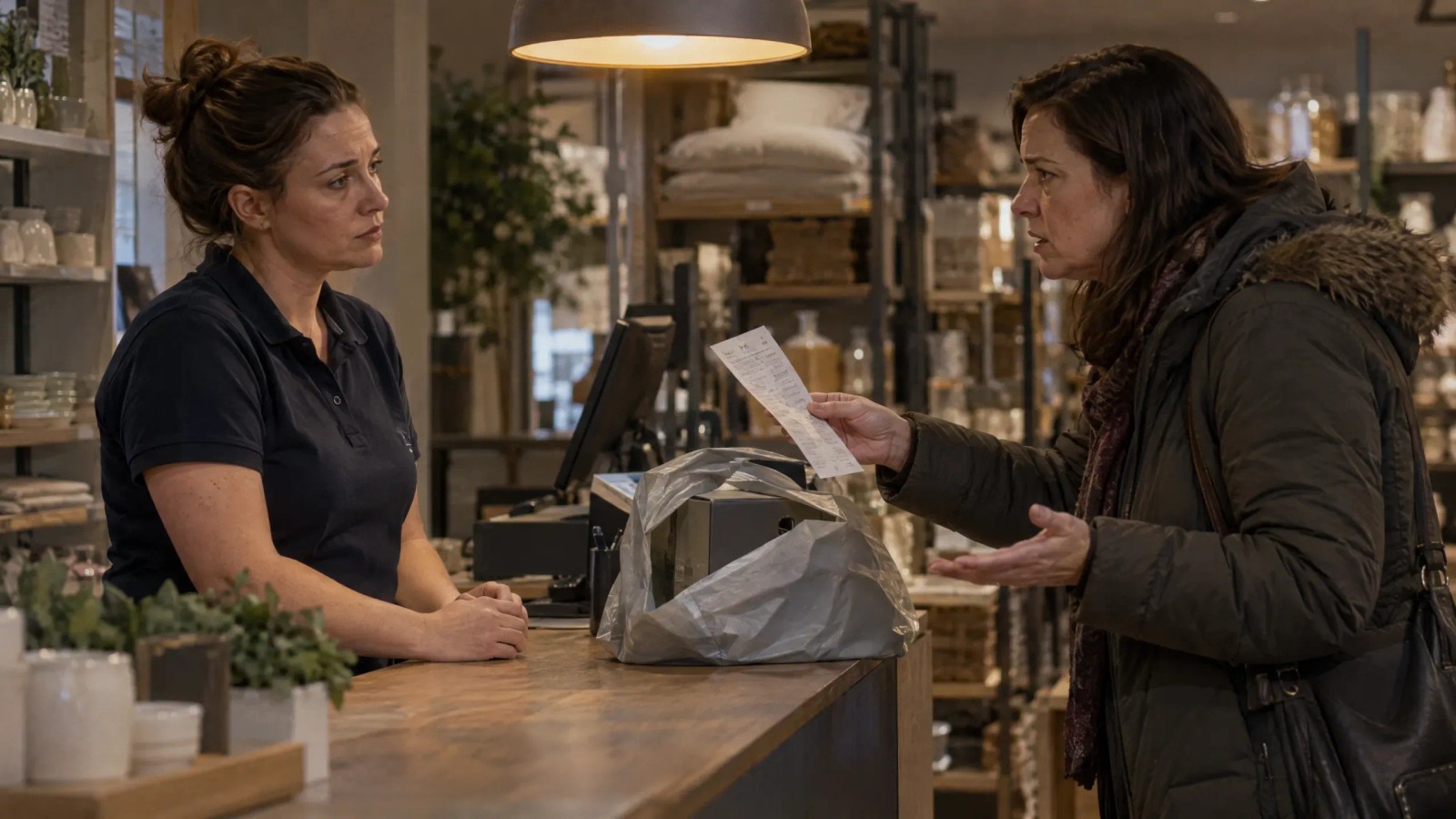
Cast: Daniel, store supervisor, forties, navy polo with a name badge. A customer, thirties, winter coat, holding a carrier bag and a receipt. A junior associate behind the till.
Location: The returns counter of a mid-sized homeware store, late afternoon, a queue of two people behind the customer.
Scene (to decision point, about 75 seconds):
- Wide shot. The customer at the counter, the associate looking towards the back office.
- Medium shot. The associate: "I'm sorry, it's past the return window. I can't put it through."
- Close-up. The customer, voice rising: "I was told in store I had sixty days."
- Medium shot. Daniel walks in from the back office and takes in the queue.
- Two-shot. The customer turns to Daniel: "Are you the manager? This is ridiculous."
- Close-up on Daniel. Hold. Stop the video.
Decision: What should Daniel say first?
| Option | Line | Follow-up scene | Debrief point |
|---|---|---|---|
| A | "Our policy is thirty days, I'm afraid there's nothing we can do." | Customer raises their voice, queue grows restless | Policy is right, but leading with it closes the conversation |
| B | "Let me take this one. Can you tell me what happened?" | Customer explains, tone drops, Daniel offers store credit within policy | Acknowledge, take ownership, then explain the options |
| C | "Fine, I'll refund it this time." | Refund goes through, associate looks undermined | Calms the moment, breaks policy and the associate's authority |
Each follow-up is two or three shots in the same location with the same cast. That's nine to twelve shots in total, plus the opening six.
What the subject expert checks: the return window stated by the associate matches the real policy, the store credit offer in option B is something supervisors are actually allowed to give, and the uniform and badge look like the company's own.
How do you keep the same characters across a training series?
This is where AI scenarios most often fall apart. A learner who sees Daniel with a beard in module one and clean shaven in module two stops trusting the material, and a branch scene where the counter has moved reads as a different store.
The fix is to treat cast, wardrobe and setting as fixed references rather than re-describing them in every prompt.
- Create a reference for each character before generating any scene. Face, build, hair, clothing, name badge. Keep it for the whole programme.
- Do the same for the location. One reference image of the counter, the till, the shelving behind it. Branch scenes reuse it.
- Lock props that carry meaning. If the receipt or the product in the bag matters to the story, give it a reference too.
- Review continuity across shots, not only within one. Lay the shots of a scene side by side and check hair, clothing, lighting direction and set layout.
Our longer guide on keeping characters and story consistent across every shot goes into the common failure points.
How should a training team review AI scenarios?
Review needs two passes and two kinds of reviewer. A production reviewer checks whether the footage is usable. A subject expert checks whether it is correct. Neither can do the other's job.
Copy this sheet and use one row per shot.
| Check | Who | Pass if |
|---|---|---|
| Character matches reference | Production | Same face, hair, clothing, badge as the reference |
| Location matches reference | Production | Same layout, same objects in the same places |
| Action matches the script | Production | The character does what the line of action says |
| Hands, text and screens | Production | No warped hands, no garbled signage that draws the eye |
| Lip sync and dialogue | Production | Mouth movement matches the line, audio is clear |
| Procedure is correct | Subject expert | Steps, equipment and wording match current policy |
| Behaviour reads as intended | Subject expert | A learner would read the moment the way the script means it |
| Representation | L&D lead | The cast reflects the people who will take the course |
| Nothing implies a real person | Legal or L&D | No resemblance to a named employee or public figure |
Any shot that fails is regenerated or replaced before the scene is assembled. Keep a log of what failed and why: the same failure on a second programme usually points to a script line that needs to be more specific.
If you're evaluating a tool before committing a whole curriculum to it, run one scenario through this sheet first. The AI video production pilot checklist sets out how to structure that test.
How do you deliver and localise training scenarios?
Most learning platforms accept a plain video file, so the simplest route is one MP4 per scene and per branch, linked by the branching logic in your authoring tool or LMS. Name files so the structure is obvious: refund-dispute_01_setup.mp4, refund-dispute_02a_policy-first.mp4 and so on.
For global teams, decide early whether each region gets its own cast and setting or a dubbed version of one film. A dubbed film is faster to roll out. A local cast reads as more relevant when the workplace itself looks different from country to country. Many programmes use both: local scenes for customer-facing behaviour, a dubbed version for internal policy.
Plan for updates as well. A policy change that moves the return window from thirty to sixty days only changes one line of dialogue, and with the cast and location saved as references, you regenerate that shot rather than rebooking a shoot.
Producing training scenarios in Induce
Induce is built for the dramatised kind of corporate video. A script or brief becomes a scene and shot plan that reviewers can sign off before footage is generated, characters, the workplace and props are saved as elements and reused across every scene in the programme, and each take is reviewed before it is kept. Finished videos of up to two minutes can be dubbed into 17 languages with Remake, with an optional lip sync pass. The corporate video production page covers the workflow, and larger programmes can start with a pilot through Induce for enterprise.
FAQ
For many short scenarios, yes, as long as a subject expert reviews every take for accuracy, just as they would review a filmed one. Live action still has an edge for long scenes with subtle performances and for content that shows your real premises or real staff. A common approach is to prototype the scenario with AI first and decide afterwards whether it needs a shoot.
It can be, provided the procedure shown is checked by someone accountable for the policy and the debrief states the rule plainly. The drama shows the behaviour, but the compliance requirement should also appear in text the learner can refer back to. Keep a record of who approved each scenario and when.
Aim for about 60 to 90 seconds up to the decision point and 20 to 40 seconds for each consequence scene. Shorter scenes are easier to rewatch and easier to update. If a scenario needs more time, it usually contains more than one decision and can be split.
Generate each branch as its own short scene with the same cast and location, then connect them in your e-learning authoring tool or LMS. The video tool produces the footage; the branching logic lives in the course. Plan the branches in a table before generating so every outcome is covered.
It depends mostly on how believable the footage is. Visible glitches such as shifting faces, warped hands or garbled signs pull attention away from the lesson, which is why the review pass matters. Test one scenario with a small group of learners before producing a full series.